

TPT-time partition testing
TPT-Time Partition Testing
TPT (Time Partition Testing) is a model-based dynamic testing tool for embedded systems, developed by Synopsys, used for functional testing of application-layer software in electronic control systems. TPT features a unique graphical modeling approach, provides rich test assessment conditions, can generate highly customized test reports, and automates the entire testing process. TPT supports many mainstream tool platforms and testing environments in the industry and can be applied throughout the entire embedded software development cycle, ensuring test case reuse from MiL to ViL. TPT provides comprehensive support especially for testing models from MATLAB/Simulink/Stateflow/TargetLink and ASCET.
As a partner of Synopsys in China, Puhui Information will help Chinese customers improve the development efficiency of embedded control systems with TPT.
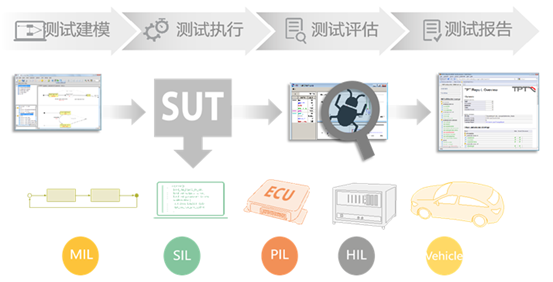
Figure 1 TPT Automated Testing Process
1. Testing Environment
TPT supports mainstream toolchains in automotive electronics to cover all testing phases in the V-model (MiL, SiL, PiL, HiL, ViL) of product development and enables the reuse of test cases across stages without changing the testing tool. The powerful Fusion platform allows users to easily create simulation environments containing different components.
Toolchains supported by TPT at different testing stages:
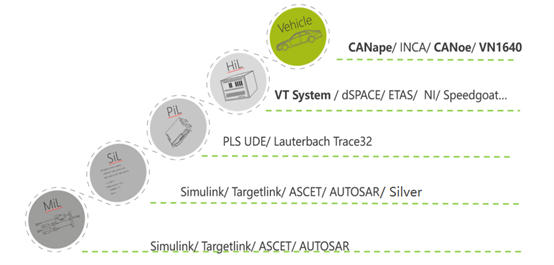
Figure 2 Mainstream Development Tools Supported by TPT
1) Model-in-the-Loop and Software-in-the-Loop (MiL-SiL)
l Supports MiL, SiL, and back-to-back testing for Simulink/TargetLink/ASCET/AUTOSAR models.
l Supports virtualization testing using the Silver platform during the SiL phase.
l Supports automatic reading of all interface information from models, manual modification, and importing internal model interface signals, ensuring convenient and accurate model setup and guaranteeing test case reuse throughout the development process.
l Automatically generates a test framework, including a complete input/output definition model and a special TPT execution engine. The test model framework forms a closed-loop test to accurately evaluate the correctness of test case execution results.
l Supports open-loop and closed-loop testing (supports DYNA4/CarMaker/Carsim, etc.).
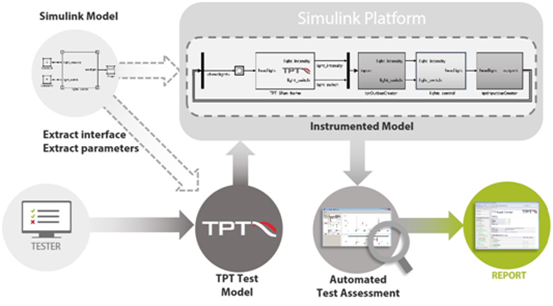
Figure 3 Simulink Model Testing
2) Processor-in-the-Loop (PiL)
TPT supports integrated debuggers for testing on actual target hardware.
l Integrated PLS-UDE: AURIX, Tricore, ARM Cortex, etc.
l Integrated Lauterbach TRACE 32: ARM, Power Architecture, etc.
3) Hardware-in-the-Loop (HiL)
l Supports integration with HiL equipment via the XiL-API interface: VT System/ dSPACE HiL/ Veristand/ ETAS LCO/ Concurrent iHawk/ Speedgoat, etc.
l Sends test cases to the HiL for execution and receives test data for evaluation.
l Supports real-time testing and fault injection (FIU).
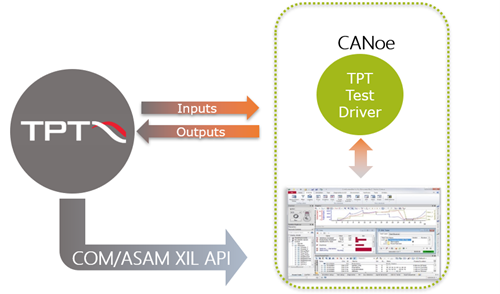
Figure 4 TPT Integrated with VT System for HiL Testing
4) Vehicle-in-the-Loop (ViL)
TPT supports integration with CANape/INCA/VN1640 for ViL testing. AutoTester is TPT's automated ViL testing tool. It triggers test cases written in TPT through a GUI interface, simultaneously instructing the driver to perform actions. TPT collects messages via VN1640 and performs automated judgment and evaluation.
l Provides convenient driving commands for testers without driving experience
l Automatically executes the same test case multiple times
l Graphical display and voice prompts during test case execution
l Simultaneously observe multiple test steps and test case execution statuses
l Automatically evaluates and generates test reports
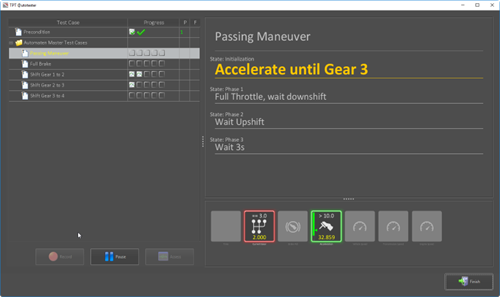
Figure 5 AutoTester Testing Interface
2. Test Case Modeling
TPT is a testing and validation tool developed for embedded systems. Its graphical method for creating test cases is easy to read and maintain. Simultaneously, TPT supports automatic test case generation for the tested models and code, providing multiple modeling methods to meet various testing needs.
1) Manual Test Case Modeling
l Step List Test Cases: Parallel structures, conditional statements, loop statements, Excel import, signal preview, defining Function Calls, etc.
l Time Partition Test Cases: Graphical approach suitable for complex models; can be encapsulated into libraries.
l Python State Test Cases: Write test cases using the Python languag.
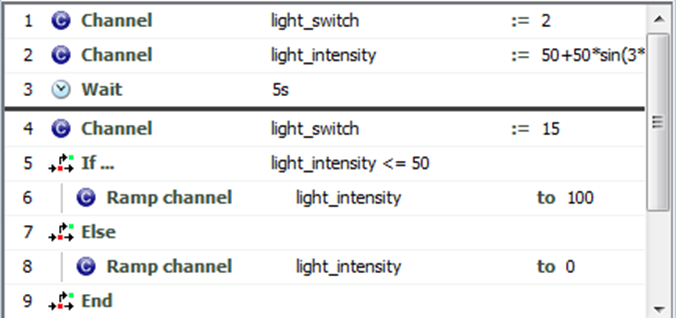
Figure 6 Step List Test Case Interface
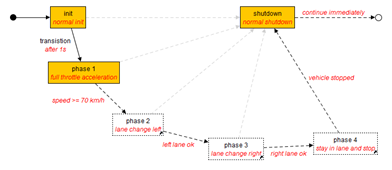
Figure 7 Time Partition Test Case Interface
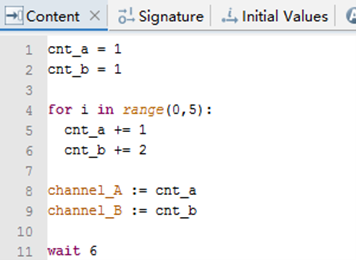
Figure 8 Python State Test Case Interface
2) Automatic Test Case Generation
l Independent Test Platform Dashboard: Creates a user interface for the System Under Test (SUT) to perform manual tests and observe the system, while recording interactions to automatically generate test cases.
l TASMO Toolbox: Automatically searches Simulink/Stateflow and TargetLink models for structural analysis based on CC/DC/MCDC principles, generating the minimum number of test cases to achieve the most comprehensive structural coverage;Supports C/C++, AUTOSAR, or Silver platforms to automatically generate cases via TASMO to improve structural coverage; allows code keyword annotation to meet coverage requirements.
l Generate Test Cases From Equivalence Classes: Divides input signals into several equivalent intervals, randomly selects values within each interval, and automatically generates test cases to traverse test scenarios.
l Generate Test Cases From Variants: Users specify or automatically select combinations of states, transitions, and paths in state machine models to generate test cases, automatically covering all test scenarios and greatly improving test modeling efficiency.
l Generate Test Cases From Value Ranges: Generates test cases in bulk by arranging all possible output signal values, supports custom signal min/max values and step sizes. TPT's specially designed default representative value mode is suitable for boundary value testing.
l Import External Test Data to Generate Test Cases: Supports simultaneous import of multiple measurement files, back-to-back testing, and regression testing.
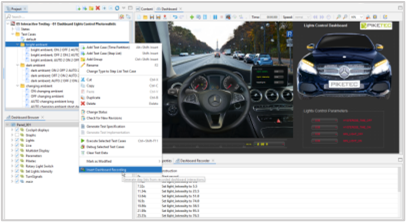
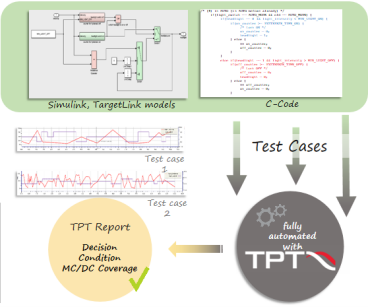
Figure 9 Dashboard Testing Interface Figure 10 TASMO Toolbox
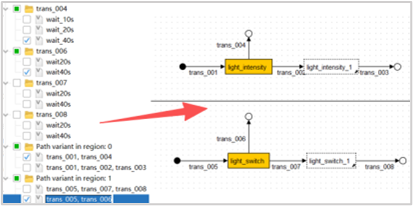
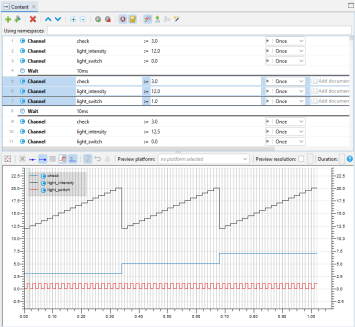
Figure 11 Generate Test Cases From Value Ranges Figure 12 Generate Test Cases From Value Ranges
3. Test Assessment and Report Generation
l Supports automatic test case assessment using GUI assessment functions, such as Trigger Rule, Min/Max, Signal Comparison, Script, Condition Tree, Sequence Check, Equivalence Classes.
l Signal Viewer: Supports signal observation and manual assessment, import/export of measurement files, synchronization of sampled signal and test signal timelines, and simultaneous observation of multiple test cases.
l Supports back-to-back testing, regression testing, fault injection testing based on model or code testing, observation of internal model signals, and tolerance settings.
l Automatically generates highly configurable test reports including Contents, Figures, Paragraph, Signal Table, Section, etc.
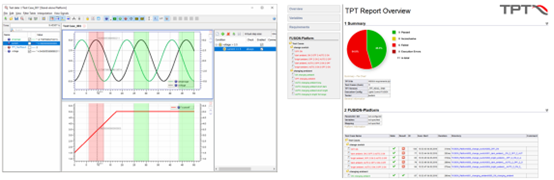
Figure 13 Signal Viewer Assessment Interface and Customized Test Report
4. Test Requirement Tracing
l Supports integration with tools like IBM Rational DOORS/Polarion/codeBeamer for test requirement import/export.
l Tracks requirement changes, status settings, and conflict analysis.
l Synchronizes test cases with requirement management tools.
l Links test requirements with test cases, assessments, etc., for testing.
l Automatically generates requirement coverage analysis reports.
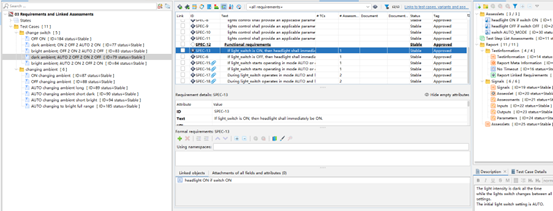
Figure 14 Test Requirement Tracing Interface
5. Testing Auxiliary Functions
TPT provides rich auxiliary functions to assist testers in their work, spanning the entire testing lifecycle from test case creation and execution management to secondary development support, aiming to enhance testing efficiency and teamwork.
l Test Case Detailed Information
TPT can assign specific user attributes, test specifications, preconditions, pass conditions, etc., to test cases. It also allows setting different fill types for attributes: Free text, Check box, File, Enumeration.
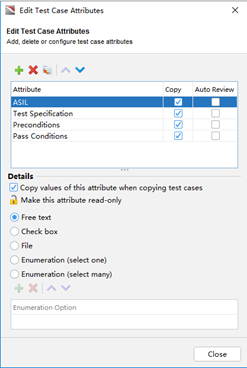
Figure 15 Set Attributes Interface
l Test Status Recording
TPT supports setting test status for test cases, test assessments, signals, equivalence class sets, execution configurations, mappings, platform configurations, requirements, etc., and manages status records. Users can create and set status types as needed and filter content like cases by status.
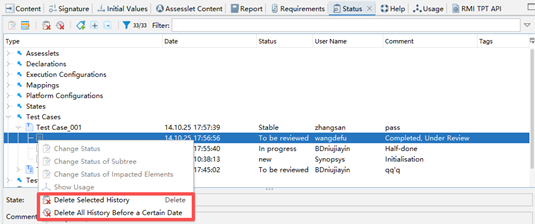
Figure 16 Status Record Management
l Test Execution Management
TPT's Batch Runner function enables unified management of test projects. Additionally, users can filter test cases based on their attribute information and status, allowing for flexible configuration of test sets.
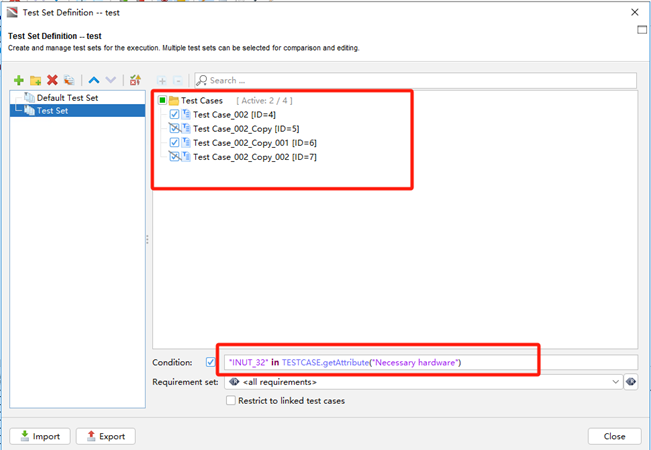
Figure 17 Test Case Filtering
l TPT API
TPT provides a rich API for environment integration and secondary development. It also supports test case format conversion and creating custom menu bars, allowing external development programs to be launched directly from within TPT, significantly enhancing the automation efficiency of the testing process.
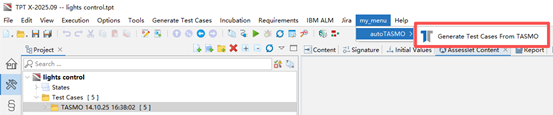
Figure 18 TPT Custom Toolbar
6. Qualification Certification
TPT supports all testing activities required by the ISO 26262 standard for product development. According to ISO 26262, when software tools are used for safety-related development activities, the tools used must undergo qualification.
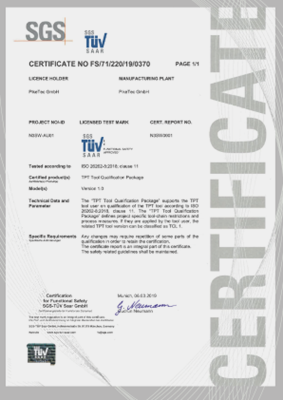
Currently, TPT has passed third-party certification by SGS-TÜV Saar, meeting the software testing requirements of ISO 26262 from ASIL-A to ASIL-D. TPT provides a Qualification Package to achieve functional safety certification for projects in the best and most efficient way.
TPT Major Customers

Domestic Customers in China