
CANape Supports Model-Based ECU Development
With the growth of ECU functions and the spread of platformization, calibration demands are expanding from powertrain and chassis systems to body and infotainment systems. CANape, provided by Germany's Vector, is mainly used for ECU parameter optimization (calibration), and can simultaneously calibrate parameter values and acquire measurement signals during system operation.
CANapeThe physical interface to the ECU can be a CAN bus using CCP (CAN Calibration Protocol), or other buses using the XCP protocol. In addition, CANape integrates powerful offline data analysis capabilities; through data mining it can automatically analyze and evaluate measurement data in batches and automatically generate analysis reports. Its integrated CDMstudio tool provides a graphical view, making it easy for users to compare, modify and merge calibration parameter files (such as PAR, DCM, CDFX, etc.) and HEX files.
Customer
HOERBIGERis an expert in automotive transmissions and clutches, and is highly acclaimed in the global automotive industry. It is committed to developing dual-clutch systems for sports and premium sedans as well as synchronized transmission systems for passenger and commercial vehicles.
Challenge
How to conveniently test the behavior of Simulink models?
In the software development for the second-generation dual-clutch transmission, engineers converted the existing, manually generated C code into MATLAB/Simulink models. The code generated from the models was then integrated directly into the AUTOSAR RTE. Each software module can be simulated with Simulink. However, the existing MATLAB Scopes visualization options were insufficient for detailed data analysis. The parameter optimization process was also time-consuming and inconvenient, requiring modification of values in the MATLAB Workspace or the generation of specific GUI elements.
Solution
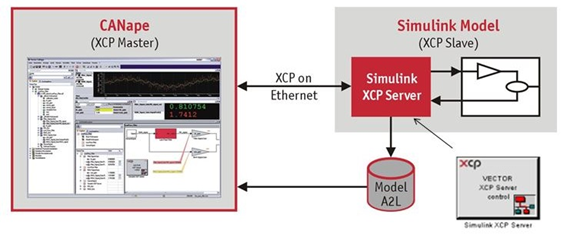
CANape was chosen as the user interface for parameterization and visualization of Simulink models and ECU internal data.
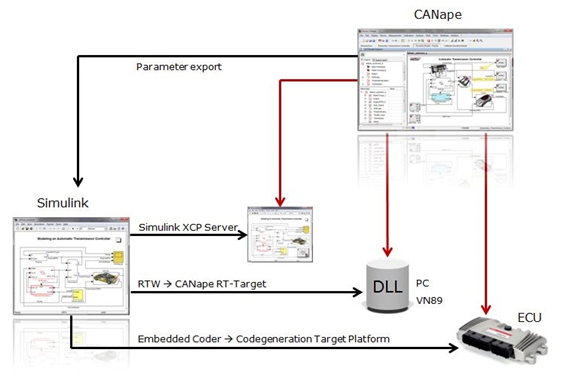
The simplest way to connect CANape and Simulink models is to use Simulink XCP Server. Users work with it in the same way as when connecting to an ECU: select measurement and calibration quantities from the description file and drag them into the display and calibration windows. With the press of a button, the necessary A2L description file can be generated from the Simulink model, and parameters in the model can be read and written without additional instrumentation.
Benefits
SimulinkModels can be visualized and parameterized
Efficient and convenient
CANape Option Simulink XCP ServerIdeal for analyzing model behavior:
Throughout the development process, the CANape configuration is the same as a standard XCP protocol configuration. It applies whether connecting to a model, a rapid prototyping platform or an ECU.
Test the model as realistically as possible; the recorded measurement data can be replayed into the model as input parameters.
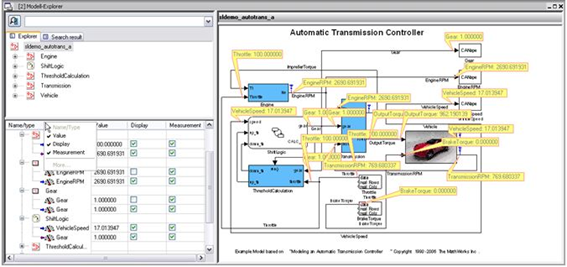
Measurement data can be easily observed and calibration data modified in CANape's various windows. No model-specific device is required.
The Calibration Data Management system with CDM Studio makes it easy to edit and manage parameter set files in models. Users can copy and merge different parameter sets, download them into the Simulink model, and save parameters in different formats such as MATLAB M-script format.
Simulation results can be saved in MDF format, enabling direct comparison between data measured on the vehicle and data obtained through manual or automatic evaluation in CANape.
The solution is scalable: for simulations with a particularly heavy computational load, the processor load can be distributed across two computers.